
Installing & Uninstalling
Windows
The Windows installer (.msi) will install Mornary under C:\Program Files\Mornary.
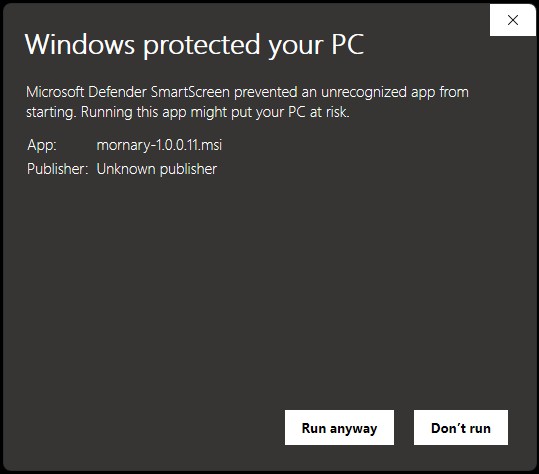
Windows Defender SmartScreen will give you a pop-up stating that this is an unrecognized app and it will ask if you want to run it or not. It will also list the publisher as "Unknown publisher. This is because Project Mornary does not have the funding to pay for a code signing certificate. You can chose to trust it or you can compile the source code yourself. Instructions for that are in the github README.
Click to view an example of the Windows Defender pop-up warning.
To uninstall, simply go to Setting > Apps > Installed apps, find "mornary" in the list,
click on the 3 dots, and click "uninstall".
Java
Fat JARs are provided for each version of the application which you can use if your operating system is not yet supported,
or if you just don't want to use the installer. These will require you to have Java installed on your machine.
You can run the JARs with java -jar mornary-[version].jar followed by the command line arguments.
Software
View Changelog| Version | Date Published | Downloads |
|---|---|---|
| 1.0.0 | Upcoming | |
| 1.0.0-beta.1 | 2026-03-08 | Windows Installer (21 downloads) |
| Java Archive (16 downloads) | ||
| 1.0.0-alpha.2 | 2026-03-03 | Windows Installer (18 downloads) |
| Java Archive (15 downloads) | ||
| 1.0.0-alpha.1 | 2026-02-26 | Java Archive (17 downloads) |
Example Files
The example files below are all Mornary-encoded. You can use them to test the application.| File | Command | Description |
|---|---|---|
| ascii-art.txt (17 downloads) | mornary -D ascii-art.txt |
This file will decode to pure ASCII text so there is no need to specify an output file. |